 How-to
Database Compatibility Testing After Migration: A Practical Guide
Last Updated: 5 November 2026
Quick Summary
Database compatibility testing after migration is the process of verifying that data, schema objects, application queries and access controls behave identically on the target system as they did on the source. It goes well beyond confirming that the database starts up, because row counts confirm volume, not meaning. The work covers structural checks, field-level validation, application behaviour, security and performance.
- Row counts can match while thousands of rows hold corrupted dates, truncated text or unexpected nulls.
- Write acceptance criteria as measurable statements, such as a reconciliation rate of at least 99.99% on financial tables.
- Reserve the cutover window for record counts, hash comparisons on high-risk tables, access checks and one end-to-end transaction.
- Run the dress rehearsal against a production-like copy at least a week before the real cutover.
- Post-cutover monitoring should run for at least two weeks, reviewed daily for the first week and weekly thereafter.
Table of Contents
- What Database Compatibility Testing After Migration Actually Covers
- Building Your Database Migration Test Plan Template
- The Post-Migration Database Testing Checklist
- Validating Application Compatibility, Not Just the Database
- Database Migration Testing Tools and Where Manual Work Still Wins
- Database Migration Performance Testing After Go-Live
- Rollback, Security and Post-Cutover Monitoring
- Planning Your Migration Validation With Hamilton Group
- Frequently Asked Questions
What Database Compatibility Testing After Migration Actually Covers
Database compatibility testing after migration is the process of verifying that data, schema objects, application queries and access controls behave identically on the target system as they did on the source. According to TestTriangle's 2026 migration outlook, 83% of enterprise migrations will fail to meet their original timelines or budget targets, and compatibility gaps discovered late are a leading reason why.
A row count tells you rows arrived, not whether a stored procedure returns the same result set, a date column kept its time zone, or a decimal rounded differently under the new collation.
Migrations are often declared a success, only for business applications to start misbehaving quietly. Below is the test plan, checklist and acceptance criteria that help catch that before cutover.
Why row counts alone prove nothing
Row counts confirm volume, not meaning: a table can return 100,000 rows on both systems while 4,000 hold corrupted dates, truncated text or unexpected nulls. Two checks close most of that gap, hash comparison or checksums over key columns, and record-level comparison against a captured baseline.
Building Your Database Migration Test Plan Template
A database migration test plan template defines what will be tested, how each test is executed, what evidence is captured and what counts as a pass. Ours has six parts, all agreed in writing before we start.
- Scope and inventory. Every schema object, table, view, stored procedure, job and integration point, with a named owner.
- Baseline capture. Source data snapshots, row counts and checksums taken before any change.
- Validation criteria. Field-level and record-level rules, expressed as pass/fail.
- Test cases. One per business rule, with the SQL or tooling used and expected output recorded.
- Environments. A target that mirrors production in collation, character set and configuration.
- Sign-off gates. Named approvers at pre-migration, cutover and post-cutover stages.
Writing pass/fail acceptance criteria
Vague criteria are the most common reason a migration is signed off and then reopened. Write each as a measurable statement: not "all customer records migrated" but "100% of customer_id values in the target match the source, with zero nulls in mandatory fields and a reconciliation rate of at least 99.99% on the financial tables".
We recommend three tiers: critical (financial and regulated tables, zero tolerance), standard (operational data, sampling plus full comparison on key fields) and low-risk (reference data, spot checks accepted). Tiering keeps effort proportionate and stops the test cycle stalling on tables nobody reads.
A reusable test case structure
Every test case should carry the same fields so evidence can be filed and audited without interpretation:
- Test ID and title, a stable reference, for example
TC-FIN-014: Invoice totals reconcile to source. - Business rule, the rule being proved, in plain English.
- Objects under test, tables, views, procedures or application screens involved.
A sample financial test case: test ID TC-FIN-014; business rule "sum of invoice lines equals invoice header total for every invoice"; objects invoice_header, invoice_line; precondition baseline captured at 02:00 on cutover day; execution a reconciliation query run on source and target; expected zero mismatches and a total variance of £0.00; evidence the query output saved to the evidence folder; pass/fail recorded by the finance data owner.
Acceptance thresholds and evidence requirements
Thresholds should be agreed before testing starts, not negotiated after a failure. A common pattern: zero tolerance on financial, payroll and regulated tables; a reconciliation rate of at least 99.99% on standard operational tables with every exception investigated; and spot-check acceptance on reference data.
Watch out: if the acceptance thresholds are written after the first test run, the plan quietly becomes a description of what happened rather than a standard the migration had to meet.
Sign-off gates and who owns them
Sign-off should be staged rather than a single event. A pre-migration gate confirms the baseline is captured and the plan approved. A cutover gate confirms critical-tier tests have passed and the rollback decision point is understood. A post-cutover gate confirms standard and low-risk tests are complete, exceptions are closed or accepted in writing, and monitoring is live. Each gate needs a named business approver, not only IT, because the person who owns the data can accept the risk.
The Post-Migration Database Testing Checklist
A post-migration database testing checklist is the ordered set of verification steps run once data has landed on the target system and before users are given access.
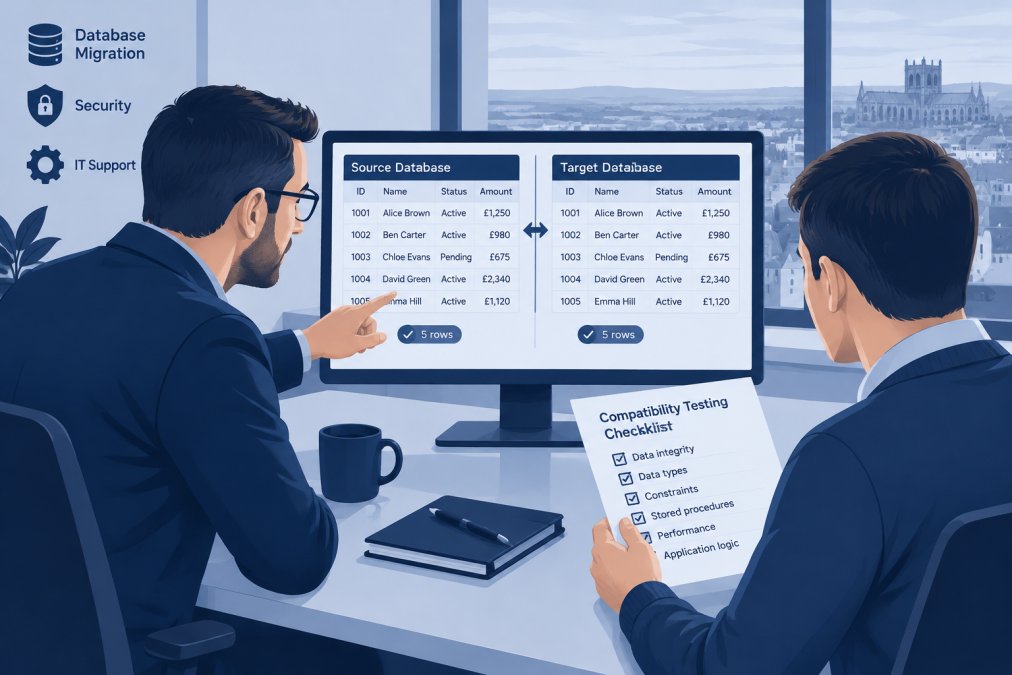
- Schema validation: tables, indexes, constraints, data types and collation match the approved mapping
- Record count comparison between source and target for every table
- Checksum or hash comparison on primary key and high-value columns
Checks that belong in the cutover window
Some checks are too slow to run during cutover and some are too important to run before it. Reserve the cutover window for record counts, a hash comparison on the highest-risk tables, login and access-control verification, and one end-to-end transaction that exercises the application. Everything else belongs in the dress rehearsal, run against a production-like copy at least a week before the real cutover.
Validating Application Compatibility, Not Just the Database
Application-level integrity is where most migration test plans stop short. Ensuring that these application-level nuances remain consistent requires rigorous attention to managing test data while maintaining strict adherence to modern privacy standards.
Test the application, not just the data. For a deeper method, our guide on how to test application data integrity after a migration walks through the verification sequence, and how to check business application compatibility after migration covers the application layer in more detail.
Database Migration Testing Tools and Where Manual Work Still Wins
Database migration testing tools automate the repetitive layer: row counts, checksums, schema comparison, field-level diffs and reconciliation reports across large tables. That automation is why Elinext's 2026 migration analysis projects that 78% of companies will use professional data migration testing services to avoid data loss. Automated SQL checks against both systems are now standard practice for verifying integrity at scale, as Kanerika's work on migration security and reconciliation sets out.
Manual testing still wins in three places. Complex schemas with layered business rules, financial and regulated tables where 100% accuracy is the requirement, and exception handling where a mismatch needs a human to decide whether the source or the target is wrong. Practitioners active in the Ministry of Testing community make the same point: automated tooling alone is insufficient for complex database schemas, and manual SQL-based reconciliation remains necessary where the numbers must be provably right.
Where tooling meets integration, our walkthrough of SaaS integration testing steps after migration covers the interfaces between systems that a database comparison will not touch.
Database Migration Performance Testing After Go-Live
Database migration performance testing checks whether the target meets its operational expectations under real load, not just whether it holds the right data.
Test the things users feel. Measure the ten most frequent application queries before and after, compare report generation times, and check batch job durations against the pre-migration baseline.
One number worth tracking: 31% of enterprise data migrations expose sensitive data in transit, according to Kanerika's 2026 security findings. Our seven post-migration performance testing steps give the detailed sequence.
Rollback, Security and Post-Cutover Monitoring
Rollback planning is the part of migration testing that gets written last and needed first. Before cutover, define the point of no return, confirm the source system remains writable or restorable until sign-off, and test the rollback itself in the dress rehearsal. An untested rollback is a hope, not a plan.
Defining rollback criteria before cutover
Rollback criteria should be written as triggers, not intentions: a critical-tier reconciliation failure that cannot be corrected within the cutover window, an application smoke test that fails on a core transaction, loss of access for a defined group of users, or a security finding such as exposed personal data.
Backup verification belongs in the same gate. Confirm that a full backup of the source was taken immediately before cutover, that the restore has been tested into a separate environment, and that the backup retention period covers the post-cutover monitoring window.
Security and access-control validation
Security and access-control validation belongs in the same gate as rollback.
Under UK GDPR, personal data must remain protected throughout the transfer, and the Information Commissioner's Office publishes guidance on the security and accountability obligations that apply to migrated personal data.
Watch out: a migration that copies production personal data into a lower environment for testing creates a data protection issue that outlives the project, so anonymise before the dress rehearsal rather than after.
Post-cutover monitoring
Post-cutover monitoring should run for at least two weeks: reconciliation reports on financial tables, error log review, and a comparison of key business metrics against the pre-migration baseline. Set thresholds in advance so anomalies trigger action rather than debate, for example, a reconciliation variance above £0.00 on financial tables, an error rate above the pre-migration baseline, or a batch job running more than a defined percentage slower than baseline. Review daily for the first week and weekly thereafter, with a named owner for each report.
Hamilton Group's proactive IT security baseline for managed clients is designed to help surface anomalies early. The same discipline applies whether the migration is a database platform change or a Microsoft 365 move: the evidence gathered during testing becomes the baseline against which post-cutover behaviour is judged.
Planning Your Migration Validation With Hamilton Group
The challenge is rarely the database engine. It is the discipline of proving, in writing, that data, applications, security and performance all survived the move intact.
Hamilton Group provides IT managed support and cyber security solutions for businesses across Yorkshire, including proactive IT management and a proactive IT security baseline for every managed client. If you are planning a Microsoft 365 move, our team sets out how we manage email, files, identities and user cutover with minimal disruption.
Speak to Hamilton Group to discuss planning your migration with a clear validation approach.
Frequently Asked Questions
How do you test a database after migration?
Start with structural checks: confirm schema objects, indexes, constraints and stored procedures exist in the target system. Then compare data at record level, not just totals. Run field-level validation on key tables, check referential integrity across related tables, and hunt for null values and duplicate records that slipped through transformation. Finish by exercising the application against the new database, since database compatibility testing only passes when the software that depends on it still works. Keep an error log and audit trail so every mismatch can be traced to a fix.
What should be checked in post-migration database testing?
A workable post-migration database testing checklist covers record counts against the source system, checksum or hash comparison on high-value tables, data completeness for mandatory fields, data accuracy on transformed values, referential integrity between parent and child tables, duplicate and orphaned records, and stored procedure behaviour. Add access-control checks so permissions match the old system, and confirm error logs and audit trails are populating. For regulated tables, sample manually as well as running automated SQL checks.
How can you test whether an application is compatible with a new database?
Run the application's own test cases against the migrated database, not just SQL queries. Cover login and authentication, report generation, integrations with other systems, and batch jobs. Pay attention to date formats, character encoding and collation settings, which are common sources of data mismatch after a move. Performance testing matters too: a query that ran in milliseconds on the old system may behave differently on the new one, so time your key transactions before and after cutover.
What database migration testing tools can help compare databases after migration?
Automated reconciliation tools run SQL checks to verify row counts and data integrity across legacy and target systems, and they are fast on large datasets. Schema comparison tools flag missing indexes or altered constraints. However, practitioners point out that automated tools can miss problems in complex schemas, so manual SQL-based reconciliation remains necessary for financial and regulated tables where 100% accuracy is required. Most teams combine both approaches rather than choosing one.